 RideLoop
How RideLoop works
Pick a start and a distance. RideLoop builds a road cycling loop for you, shows how good each road is for riding, and sends the loop to your Garmin. Here's the whole thing, step by step, on a phone.
Step 1
Choose a start, a distance and your ride
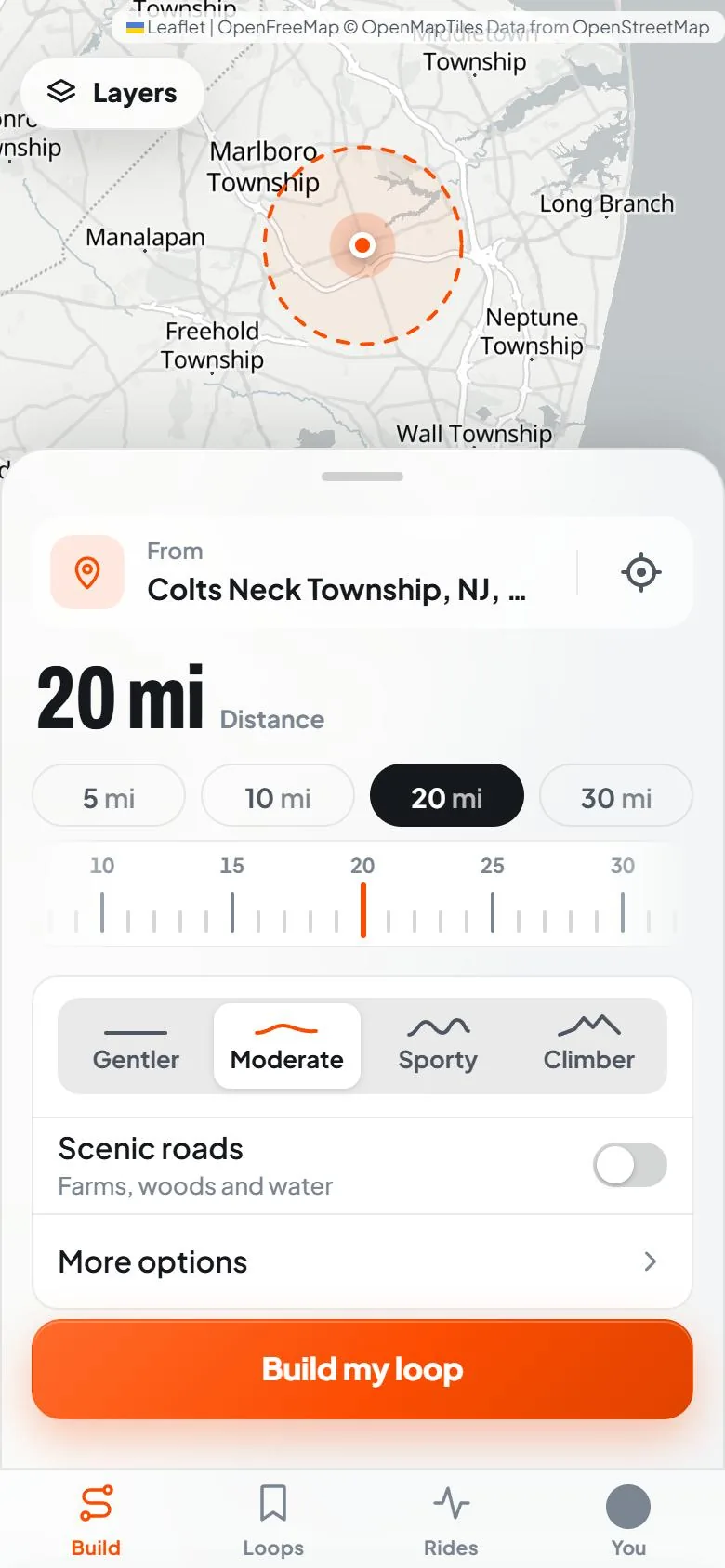
Tap From and type an address, press My location, or tap the map. Save as home makes every loop start at your door.
Pick a distance with 5 mi, 10 mi, 20 mi or 30 mi, or slide the ruler anywhere from 2 to 80 miles. Choose how hilly: Gentler, Moderate, Sporty or Climber. Turn on Scenic roads for farms, woods and water.
More options holds the rest: Quiet roads (keeps you off highways and state roads), True loops (no out-and-backs), roads to avoid, road closures and must-ride waypoints. Then press Build my loop.
Step 2
Get a loop, automatically
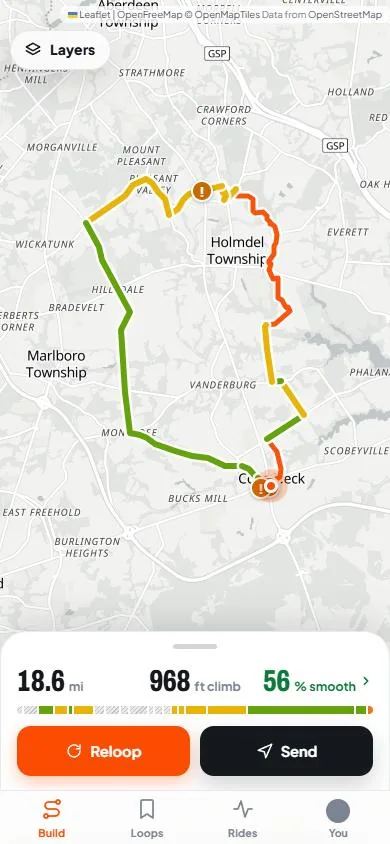
No dragging a line road by road. RideLoop builds a loop of about your distance that starts and ends where you chose, weighing pavement, traffic, shoulders and climbing as it goes. Each road on the map is colored by its pavement grade.
Not your kind of ride? Press Reloop for a different one, or step through the loops it found with the arrows. Keep saves a loop to Your loops to ride again.
Step 3
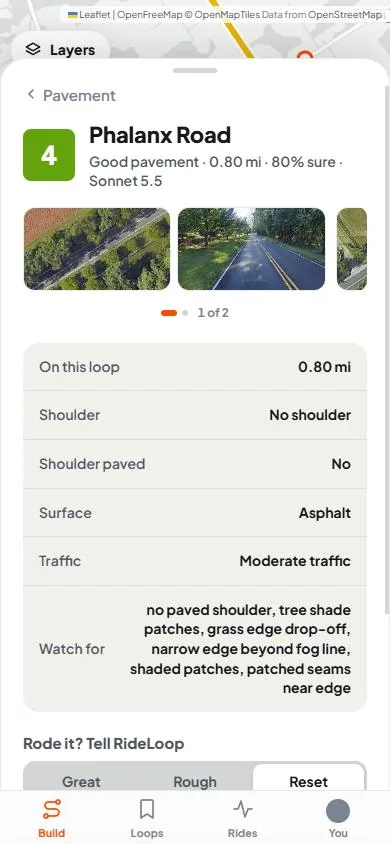
Check the road grades
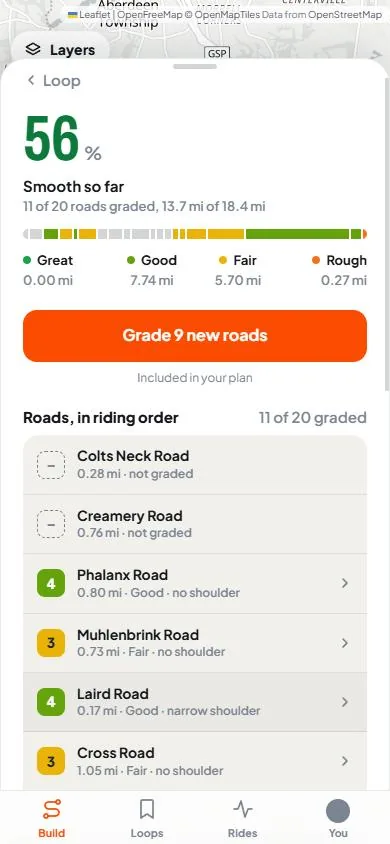
Tap the % smooth score to see every road on the loop in riding order. Each graded road has a pavement grade from 1 (Bad) to 5 (Great), plus its shoulder (wide, narrow, none or a bike lane) and how busy it is (quiet, moderate or busy). Tap a road for its details and what to watch for.
Not every road is graded. Grades come from riders, so some areas have many more than others. A road without one shows as not graded, and the score reads Smooth so far with how many roads and miles it covers, like "11 of 20 roads graded". Press Grade 9 new roads (or Grade this loop) to fill in the gaps from your plan's grading allowance.
Rode a road and the grade was off? Mark it Great or Rough under Rode it? Tell RideLoop.
Step 4
Review climbing, weather and stops
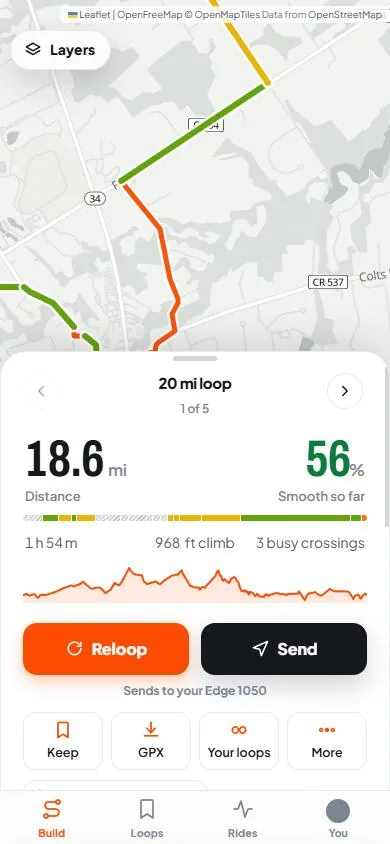
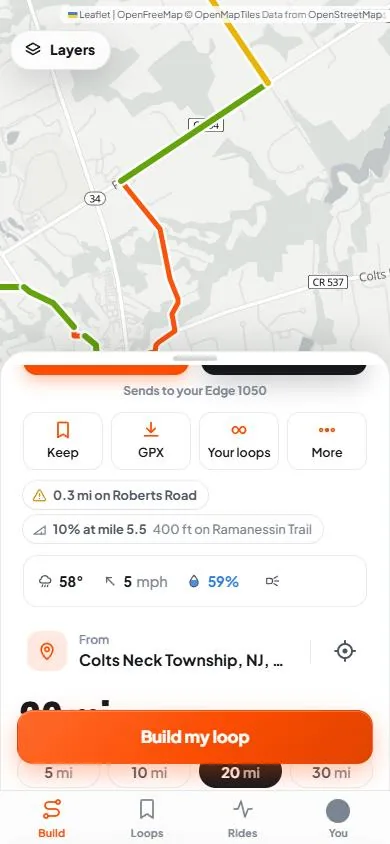
The ride card shows the distance, an estimated ride time, total climb and how many busy road crossings the loop has. Drag along the elevation graph to see each road, and a chip calls out the steepest climb, like "10% at mile 5.5".
The weather row shows the temperature, wind and the chance of rain from the National Weather Service (US only). On a windy day loops favor heading out into the wind, and the card says Tailwind home. If you'd finish after dark, it reminds you to bring lights.
Stops such as cafés, water, bike shops and restrooms show on the map in New Jersey, where that data is live today. When a café fits the loop, the Coffee stop switch routes you past it.
Step 5
Send it to Garmin
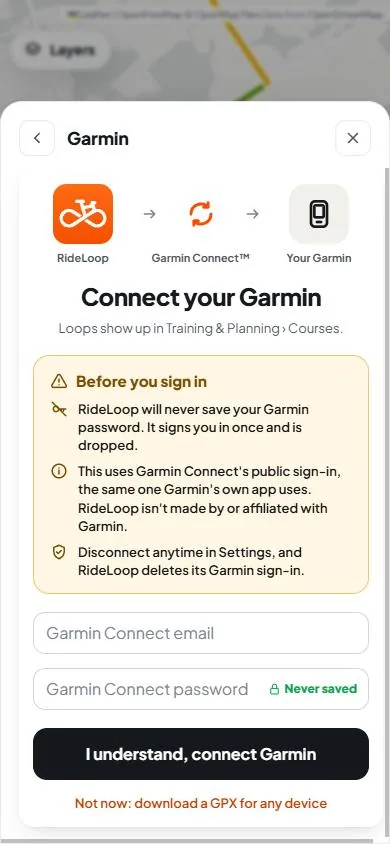
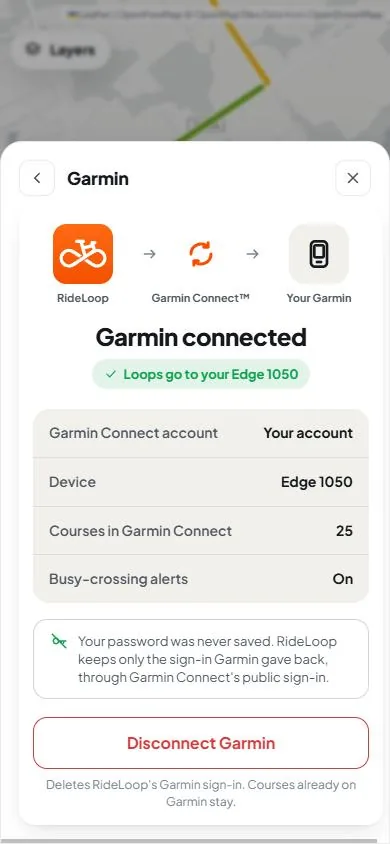
Connect once: You › Settings › Garmin, sign in with your Garmin Connect email and password, and press I understand, connect Garmin. RideLoop never saves your Garmin password. After that, every loop is one press of Send.
- Free (Bronze): the loop lands in Garmin Connect as a course. Open the Garmin Connect app, find the course and tap Send to Device.
- Silver and Gold Paid: the loop goes straight to your Edge or watch and arrives on its next sync.
- No Garmin? Press GPX on any plan for a file that works with any bike computer or app.
RideLoop's Garmin connection is unofficial. RideLoop isn't made by or affiliated with Garmin; it uses Garmin Connect's public sign-in, and Garmin could change how that works. How RideLoop handles your Garmin sign-in.
Newer to road riding?
Planning on quieter roads can make it easier to get started. Turn on Quiet roads, pick Gentler hills and a short distance, and read each road's shoulder and traffic before you go. RideLoop is a planning tool, not a promise: no route is guaranteed safe, grades can be out of date, and conditions change. Check the roads yourself and decide what suits you and anyone riding with you.
What's free, what's paid
Building loops, seeing shared grades and GPX downloads are free. Paid plans add more loops, more grading and direct sends.
| Bronze (free) | Silver | Gold | |
|---|---|---|---|
| Loops a month | 20 | 100 | No limit |
| Shared road grades | Yes | Yes | Yes |
| Grade new roads | About 200, once | 150 a month | 400 a month |
| Send to Garmin | To Garmin Connect | Straight to device | Straight to device |
| GPX download | Yes | Yes | Yes |
| Kept loops | Newest 2 | All | All |
Every press of Build my loop or Reloop counts as a loop; sending and downloading don't. Gold starts with 14 days free on your first subscription. See current plans and prices.
Questions
Is RideLoop free?
Yes. The free plan, Bronze, builds 20 loops a month, shows every road grade other riders have shared, grades about 200 roads once so you can try it, keeps your newest 2 loops, sends loops to Garmin Connect and downloads GPX for any device. No card needed.
What do the paid plans add?
Silver builds 100 loops a month, grades 150 roads a month on your loops, keeps every loop and sends loops straight to your Garmin device in one tap. Gold has no limit on loops, grades 400 roads a month and starts with 14 days free on your first subscription. The pricing page has the full list and current prices.
Is every road graded?
No. Grades come from riders, so some areas have many more than others. Roads without a grade show as not graded, and the loop's score says Smooth so far until every road on it is graded. You can grade a loop's new roads from your plan's allowance.
What do I need to send a loop to Garmin?
A Garmin Connect account. Connect it once in Settings by signing in to Garmin Connect; RideLoop never saves your Garmin password. On the free plan, loops land in Garmin Connect and you send them on to your device from the Garmin Connect app. Silver and Gold send them straight to your Edge or watch.
Is RideLoop an official Garmin app?
No. RideLoop isn't made by or affiliated with Garmin. It connects through Garmin Connect's public sign-in rather than an official Garmin integration, so Garmin could change how that works.
Do I need a Garmin?
No. Every plan can download a loop as a GPX file for any bike computer or phone app.
Is RideLoop good for new riders?
It can help. Loops favor quieter roads, and the grades show where a road has no shoulder or busy traffic before you ride it. But no route is guaranteed safe, and grades can be out of date, so check the roads yourself and decide what suits you and anyone riding with you.
Try RideLoop
Pick a start and a distance, and get your first loop in about a minute. You can read this page without an account; building a loop needs a free one.
Try RideLoop freeFree plan: 20 loops a month, no card needed. Compare plans